Deposit/Fund Options

DO NOT FORGET TO FILL IN THE FORM BELOW AFTER YOU SEND FUNDS, OR IT WILL NOT BE PROCESSED!!!

Click one of the options (it will open with all details to make a deposit or fund your account)
You can also fund your account (login and click here) There is an option to pay by Bitcoin etc. on the checkout page (we able to accept 2300+ cryptocurrencies) For more info on payment options have a look here
Hosting 10% OFF

How to deposit by Payoneer?


1. Log in to your account here or signup here
2. From the menu, go to Pay ->> Make a Payment.
3. Type the email address: [email protected] and click next.
4. Enter the amount you want to pay, (minimum $50)
5. Type in a short description of what you are paying for: “Freelance Services”
6. Please fill in the form below.

NOTE: In order to transfer funds to another account holder, the minimum amount for transfers is $50. The option to send a payment has to be active on your account.

How to deposit by NOWPayments?


We recommend to use on the checkout page CoinPayments option, but if you really wish to use NOWPayments you should contact us first here: Contact Us
You have to request a payment link from us and tell us which service (send the url of the service) you want to order with which extras (if any) and which coin you want to pay with: Supported Coins
To signup for an account: Signup here

How to deposit by BTC?


Send to the BTC wallet address:
19jR6P4ms254FVcdGh6Vp8zDRBYwErHuNW


or scan the QR Code:
QR CODE BITCOIN

Calculate the amount you have to send in BTC (GBP –> BTC)

Source: CurrencyRate

How to deposit by Litecoin?


Send to the LTC wallet address:
M8MUzfq8NPiSZXzVuCp6DZLau8mDGUhhJ6


or scan the QR Code:
QR CODE LITECOIN

Calculate the amount you have to send in BTC (GBP –> LTC)

Source: CurrencyRate

How to deposit by Wise?


Log in to your account here or sign up here
Send to:
Email to send funds by wise

How to deposit by Airtm?


1. Log in to your account here or signup here
2. From the menu, go to Send/Request
3. Type the username: pacospain
4. Enter the amount you have to pay. (+ £2)
5. Type in a short description of what you are paying for: “Freelance Services
6. Please fill in the form below.

NOTE: Add + £2 on top of what you have to pay, these are fees that has to be paid
What is this?
The below general payment links of Stripe can be used to fund your account or to pay for any order (you able to change the amount) make sure to add in the note which service it is (URL) and the info we need, see the service for that!
GBP
https://buy.stripe.com/00w3cvaLh0sMdYm1Xl83C00

USD
https://buy.stripe.com/28E4gz7z5ejCdYm59x83C01

EURO
https://buy.stripe.com/8x27sLbPl7Ve07wbxV83C02
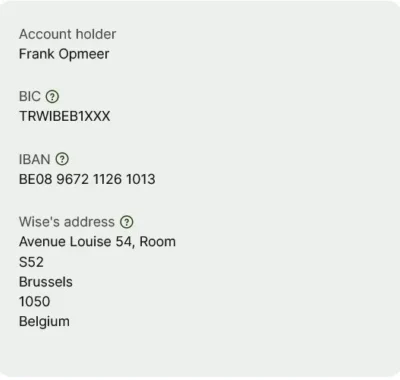
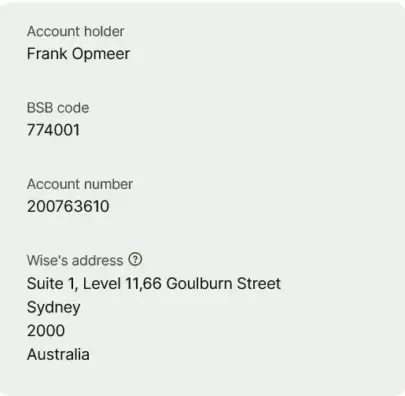
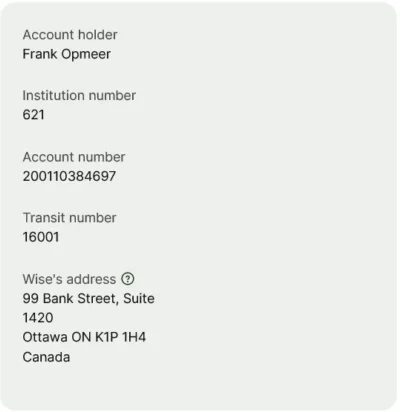
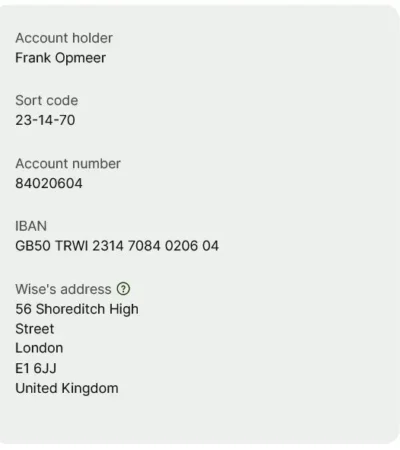
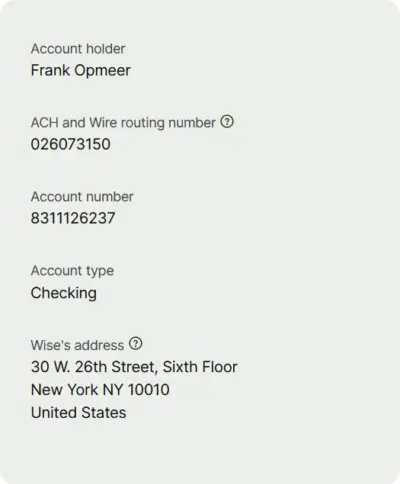
How to deposit by Bank ?
Send to one of the below bank accounts or for other country banks, contact us, We have bank accounts in Hungaria, New Zealand, Turkey and Singapore.

THAILAND

Thailand Bank Details

UK

UK Bank Details

USA

USA Bank Details

EUROPE

Europe Bank Details

AUSTRALIA (only local)

Australia Bank Details

CANADA (only local)

Canada Bank Details

You can always use the other payment options on checkout or Add funds to your account for more options.


Fill In The Form Below

Amount:
Transaction ID:
Username on Adultseo:
Click or drag a file to this area to upload.